
Magento is the platform I work on most, and I recently heard a thesis that sounds like a provocation: Magento is the new COBOL of e-commerce. COBOL is a language from the 1960s that still runs a good share of the world’s banking systems. Nobody shows it off at conferences, yet it handles the money of millions of people every day.
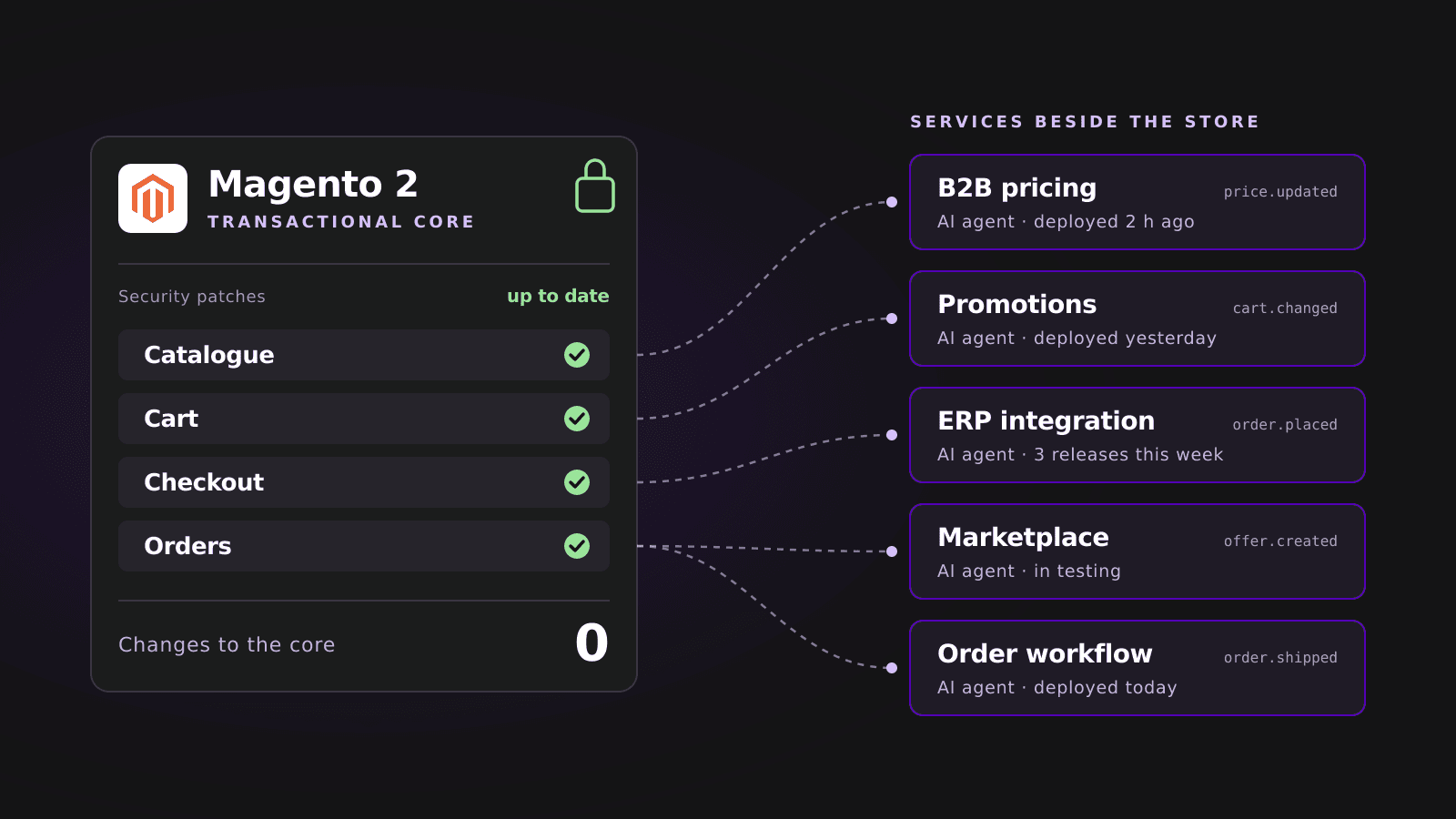
The longer I think about it, the more I agree. Magento 2 can play the same role in your store. Its job is to run the catalogue, cart, checkout and orders reliably and get its security patches on time. Everything that changes week to week can live beside it.
What banks learned from COBOL
Let’s start with the numbers. In 2017 Reuters estimated that around 220 billion lines of COBOL were in use. Five years later a study commissioned by Micro Focus counted more than 800 billion lines in daily use1. According to IBM, the mainframes this code usually runs on handle 68% of the world’s production IT workloads and 90% of card transactions2.
Why don’t banks just rewrite it? Because they’ve tried. In April 2018 the British bank TSB moved its customers to a new platform. A significant share of its 5.2 million customers were hit by problems, and the bank only got back to business as usual in December. Regulators fined TSB £48.65 million, and customers received £32.7 million in redress4. At Australia’s Commonwealth Bank, the core banking replacement ran at least nine months late and its cost grew to A$1.1 billion5.
Martin Fowler, one of the best-known writers on software architecture, has been describing a safer route since 2004. The old system stays, and new functions grow beside it as small parts that gradually take over its jobs. Because those parts are small, introducing them carries little risk6.
See the common thread? A stable core nobody touches without good reason, and changes made at the edges.
Magento 2 as a transactional engine
Now look at Magento 2 the same way. A customer browses the catalogue, puts products in the cart, pays and gets an order confirmation. Magento has done these four things for years, and every store needs them in almost the same shape.
You can rely on this core because Adobe looks after it by published rules. Each release line gets three years of standard support. Version 2.4.9 came out on 12 May 2026 and is supported until 31 May 2029; 2.4.8 is supported until 31 May 2028. When a vulnerability is already being exploited, Adobe ships a fix for every supported version3.
Security fixes come out as separate, small patches so stores can install them faster, without waiting for a full release. Once a year, in May, Adobe publishes a full patch for every supported line7. On top of that, Magento and Adobe Commerce, B2C and B2B alike, are covered by a paid bug bounty programme in which Adobe pays researchers for the vulnerabilities they report8.
So a store owner knows how long their version will get patches and can plan the upgrade well ahead.
Patches only protect the stores that install them
And what happens when the patch exists but the store doesn’t install it? The past two years have given a painful answer. Sansec, a Dutch company that tracks break-ins to Magento stores for a living, documented each of these stories:
- 2024, CosmicStingAdobe released the patch in June. When criminals started scanning stores en masse, around 75% still didn't have it. By October 4,275 stores had been breached, about 5% of all of them, including stores of National Geographic and Ray-Ban9.
- 2025, SessionReaperThe patch came out on 9 September. Six weeks later 62% of stores still hadn't installed it. Mass attacks hit 49% of stores, and Sansec estimated that criminals had left a backdoor in 16–18% of all Magento stores10.
- 2026, PolyShellThe flaw was disclosed on 17 March, and by 14 April malicious files had reached 82% of stores. The fix shipped in version 2.4.9 in May, but only reached older supported lines on 14 July11.
- 2026, StyleSmugglerA flaw with the highest possible severity score that let attackers take over a store without logging in. Attacks began on 4 September, and Adobe shipped a fix for versions 2.4.4–2.4.9 by 7 September. Stores on 2.4.3 and older got nothing12.
PolyShell shows that Adobe can be slow too, and I won’t pretend Magento is immune to everything. The other three stories point the same way, though. Criminals got in through the window between a patch’s release and its installation, and that window stayed widest in stores that waited for weeks or ran an unsupported version.
In practice, then, Magento 2 security comes down to one thing: how quickly your store can take a patch.
Every module in the core puts the patch further away
Most stores we take over carry dozens of modules inside Magento: custom pricing rules, promotions, ERP integrations, marketplace exports, unusual order statuses. Each of them runs in the same process as the cart and checkout.
Adobe says plainly that reviewing custom modules is the most time- and resource-intensive part of an upgrade, and that changes to Magento’s own code have to be cleaned up beforehand13. In its developer documentation Adobe also explains where that cost comes from. On modules running in the same process as the store, it says14:
It also couples custom code to the Commerce version, PHP runtime, internal APIs. Adobe on in-process code, Adobe Commerce extensibility documentation
Think about that for a moment. Every promotion built into Magento lengthens the road from a patch’s release to its installation in your store. With SessionReaper, that road took more than six weeks for most stores10.
New ideas beside the core
Adobe has reached the same conclusion. In the Adobe Commerce documentation, extensions that run outside the store’s process are now the recommended starting point, both for new apps and for modernising old customisations. Adobe lists their strengths outright: upgrade safety, isolation and independent delivery14.
In the cloud edition, Adobe Commerce as a Cloud Service, this is already the rule. Extensions run as separate applications, scale independently of the core, and developers can change them without waiting for a new platform release15. The store sends out events, such as an order being placed, and an external application reacts to them and fetches the data it needs through the API16.
What does that look like in practice? Here are things we usually build as Magento modules today that could run as small, separate services:
- B2B pricing. The service works out a trade customer’s price from their contract and returns it to the store. Changing the price list doesn’t touch the cart.
- Promotions. Campaign rules live in a separate service that marketing can change more often than once a sprint.
- ERP integration. On an “order placed” event the service passes the order to the ERP, and stock levels and prices flow back to Magento through the API. An ERP outage doesn’t stop checkout.
- Marketplace. Exporting offers and importing orders from sales platforms runs beside the store, at its own pace.
- Order workflow. Approvals, notifications and hand-off to the warehouse react to changes in order status.
The core then handles selling and nothing else, and an upgrade means checking far less code. We already work this way on the store of .mdd, an office furniture maker: a custom checkout built on React and Node.js runs alongside Magento there, and we look after the data exchange between the store, the ERP, SAP and the company’s microservices. You can read more about how we connect stores to business systems on our ERP and CRM integrations page.
Where AI agents come in
The DORA 2025 report, based on answers from nearly 5,000 people in IT, describes AI as an amplifier. Teams working on loosely coupled systems with fast feedback loops gain from AI, while those tied to tightly coupled systems and slow processes see little or no benefit. The same report warns that AI adoption still goes hand in hand with lower delivery stability17.
A small service beside Magento is exactly that kind of loosely coupled system. It has one job, little code and a clear contract with the rest of the store. In GitHub’s controlled experiment, developers with an AI assistant wrote a small HTTP server 55% faster than those without one18. When METR measured experienced developers working on large, mature projects, the result went the other way: with AI their tasks took 19% longer19. The two studies measured different things, but they point the same way: AI helps most with small, well-defined tasks, and a separate service is that kind of task.
There’s a flip side. Veracode tested code generated by more than 100 language models and found security flaws in 45% of the samples20. That’s why agent-written code shouldn’t go into checkout and payments. In a separate service with limited permissions, a bug stays in one place, and the store’s core, which handles customers’ money, stays untouched.
A change to such a service can reach production within hours, without touching Magento and without waiting for the whole store’s release window.
How many services is too many
I’m not suggesting you split your store into a hundred microservices. In 2023 the Prime Video team described moving one of its monitoring services from many small parts back into a single application, cutting its infrastructure cost by more than 90%21. The lesson: carve services out along business jobs, such as pricing or the ERP integration.
These are the questions we start with when deciding what to move outside Magento:
- Check your version and its end-of-support date. If your Magento line loses support within a year, the upgrade goes to the top of the list, ahead of any new feature3.
- List the modules in the core. For each one, ask whether it has to run while the order is being placed. If not, it's a candidate to move out.
- Start with what changes most often. Promotions, price lists and integrations change every week, so they gain most from being released separately.
- Keep checkout and payments in the core. That's the part that has to be the most stable and the most thoroughly tested.
- Connect services through events and the API. A service shouldn't write to Magento's database directly. That way a store upgrade doesn't break the integration.
How we work
At WEGOTCOOKIES a developer leads the AI agents and personally reads and approves every change they make. The agents work in isolated environments, have no access to environments holding data, and take no action in production without a developer’s supervision. That’s how you get up to 5× more finished work for the same rate. You can read more on our AI page, and about the platform itself on the Magento 2 page.
It works best with a stable, patched Magento core and small services beside it that agents build quickly while a developer keeps an eye on their quality.
If you remember one thing from this post, make it this: a secure Magento store is one that can take a patch within days. The less logic sits in its core, the easier that gets, and new ideas can grow beside it at their own pace.